
By Michael Nielsen, Publisher | 15+ Years in Diesel Repair
Last Updated: October 2026
Digital work orders replace paper-based repair documentation with tablet- and smartphone-accessible platforms that capture technician time, parts, photos, and customer sign-off in real time instead of on a clipboard. For a diesel or heavy-duty shop, the difference shows up first in technician time: paperwork that used to eat into billable hours gets handled by a system that validates entries, pulls vehicle data automatically, and never gets lost in a filing cabinet.
Paper-based workflows carry real costs beyond printing and storage, and the compliance side matters too. 49 CFR 390.32 allows electronic records and signatures for documents required under the FMCSRs, with conditions, and FMCSA's 2026 eDVIR rule added explicit electronic language to the inspection report sections. This Heavy Duty Journal guide covers what to capture, what the rules say, and how to roll it out.
Key Takeaways
- ✓Federal rules allow electronic records. 49 CFR 390.32 lets carriers use electronic records and signatures, with conditions on retention, reproduction, and consent.
- ✓DVIR repairs are now explicitly covered. FMCSA's eDVIR rule, effective March 23, 2026, added electronic-format language to 396.11 and 396.13.
- ✓Retention periods do not change. Maintenance records are kept 1 year plus 6 months after a vehicle leaves control, and DVIR records 3 months.
- ✓Capture heavy-duty details. Unit, engine hours, authorization, parts, sublet, and photos belong on every work order.
- ✓Measure your own savings. FMCSA could not quantify eDVIR savings, so time your own paperwork before and after.
In This Guide
- Digital Work Orders vs Paper: The Hidden Costs of Paper
- Understanding Digital Work Order Systems
- What a Heavy-Duty Work Order Should Capture
- From DVIR Defect to Repair Record: The Federal Rules
- Real-Time Information Access and Workflow Optimization
- Eliminating Documentation Errors Through Automation
- Mobile-First Solutions for Technicians
- Measuring the Productivity Impact
- Search, Retrieval, and Records
- Implementation Strategies for Paperless Shop Management
- Training Staff for Digital Workflow Success
- Cost Analysis: What to Count Before You Buy
- Frequently Asked Questions
- The Bottom Line
Digital Work Orders vs Paper: The Hidden Costs of Paper
Shops relying on paper systems face expenses that extend well beyond printing and storage. Traditional documentation creates operational drag that reduces productivity, frustrates technicians, and erodes profit margins one small delay at a time.
Time Lost to Manual Documentation
Technicians lose billable hours writing work orders by hand, searching filing systems, and re-entering the same information across multiple forms. A typical repair document passes through several hands before it reaches management or the customer, creating delays that hold up service decisions that should take minutes, not hours.
The drain gets worse when a technician has to decipher illegible handwriting or reconstruct a document that's gone missing. Every lost document triggers time-consuming reconstruction that pulls a skilled technician away from repair work that actually generates revenue.
Common Errors in Traditional Paper Systems
Manual transcription introduces error rates that show up in the documentation itself — incorrect part numbers, inaccurate labor calculations, and missing customer authorization signatures among them:
- Illegible handwriting causing incorrect parts orders and inventory discrepancies
- Duplicate entries generating billing disputes and customer dissatisfaction
- Incomplete service histories affecting warranty claim approvals
- Missing authorization or inspection documentation that a fleet customer or auditor later asks for
Impact on Profitability and Customer Satisfaction
Documentation inefficiencies cost time you can count: lost technician hours, filing supplies, and storage space. Beyond the direct expense, missing paperwork can create trouble during an audit, and customer trust erodes when a shop cannot quickly pull up a service history or produce an accurate estimate. The cost section below shows how to count your own.
1 year + 6 months
Retention period for each vehicle's inspection, repair, and maintenance records under 49 CFR 396.3: 1 year, and 6 months after the vehicle leaves the carrier's control.
Understanding Digital Work Order Systems
Digital work orders replace paper forms with platforms accessible through tablets and smartphones. These systems build an accurate maintenance history automatically while eliminating the transcription errors that come with copying the same information onto three different forms.
Core Components of Electronic Work Order Systems
Modern platforms integrate features that work together: real-time data entry lets technicians document repairs as work progresses, photo and video capabilities capture visual evidence of damage and completed work, and automatic time tracking records labor hours without manual entry. Digital parts catalogs link directly to work orders for accurate pricing, and integration with diagnostic equipment pulls vehicle data automatically — no manual VIN entry or spec lookup required.
Cloud-Based vs. On-Premise Solutions
Shops choose between two deployment approaches, and each carries real operational trade-offs. Prices vary by vendor and shop size, so get written quotes instead of relying on a generic range.
| Feature | Cloud-Based | On-Premise |
|---|---|---|
| Cost structure | Usually a subscription | Usually an upfront license plus hardware |
| Data access | Anywhere with an internet connection | Local network unless you set up remote access |
| Maintenance | Provider handles updates | Your IT staff or a contractor handles them |
| Backup | Provider-managed, ask about redundancy | You configure and test it |
| Connectivity | Needs a connection, so ask about offline mode | Works on the local network |
Integration With Existing Shop Software
Digital workflow platforms connect with shop accounting, parts, and scheduling systems through integrations, which can sync data between work orders, inventory, and billing. Ask each vendor which systems it connects to and how, so you avoid duplicate entry and keep the audit trail a compliance review or warranty dispute might require. HDJ's shop management software guide covers features that matter for heavy-duty work.
What a Heavy-Duty Work Order Should Capture
A heavy-duty work order carries more than a customer complaint, because jobs run for days, involve several technicians, and wait on parts and fleet approvals. Capture these items on every work order:
- Unit number, VIN, odometer, and engine hours
- The complaint and any DVIR reference
- Who authorized the work, when, and up to what amount
- Labor lines with the assigned technician
- Parts with part numbers and expected arrival dates, plus cores and warranty flags
- Sublet work, the vendor, and the promised date
- Photos, notes, and the completion check
Federal rules shape what a maintenance record contains. 49 CFR 396.3 requires a record of inspection, repairs, and maintenance showing their date and nature. See 49 CFR Part 396. A digital template that requires these fields helps ensure each work order holds what a fleet customer or auditor will ask for.
From DVIR Defect to Repair Record: The Federal Rules
Heavy-duty shops work closely with driver vehicle inspection reports. Under 49 CFR 396.11, before a driver operates a vehicle again, the motor carrier or its agent must repair any defect listed on the report that would likely affect safe operation, and must certify on the report that each defect was repaired or that repair was unnecessary. DVIRs and the repair certifications are kept for 3 months. HDJ's DVIR guide covers the full process.
As of October 2026, FMCSA's eDVIR final rule is in effect. Published February 19, 2026 (91 FR 7893, Docket FMCSA-2025-0115) and effective March 23, 2026, it added language to 396.11 and 396.13 saying the reports may be created and maintained in electronic format in accordance with 49 CFR 390.32. See the Federal Register rule. FMCSA also said it will continue to allow paper DVIRs.
Section 390.32 has conditions. Electronic documents must accurately reflect the required information, be capable of being retained, be used for the purpose for which they were created, and be reproducible within the required timeframes for anyone entitled to access them. Electronic records must also include proof of consent to electronic records as the E-SIGN Act requires. See the regulation text.
For a shop, the practical loop is: DVIR defect, work order, repair, certification, record. A digital work order that links to the source report and captures who certified the repair and when keeps that chain in one place. Maintenance records under 396.3 are kept where the vehicle is housed or maintained for 1 year, and for 6 months after it leaves the carrier's control.
Keep Your Fleet Running at Full Capacity
Get HDJ's maintenance guides, compliance updates, and fleet management strategies delivered weekly — built for working diesel professionals.
Real-Time Information Access and Workflow Optimization
Digital work orders eliminate the waiting built into manual filing. A technician retrieves a vehicle's service history, part specifications, and repair procedures in seconds instead of digging through a physical archive, and a service manager watches job progress on a dashboard instead of walking the shop floor to ask.
| Traditional Paper System | Digital Work Order System |
|---|---|
| Minutes to locate a record, sometimes longer | Seconds, via search |
| Single user access only | Multiple simultaneous users |
| Manual status updates | Real-time progress tracking |
| Physical storage required | Cloud-based accessibility |
Multiple team members can access and update the same work order simultaneously, which prevents the communication gaps and duplicate effort that come with a single paper copy moving from desk to desk. Service advisors gain visibility into workload distribution and bay availability, making it easier to spot bottlenecks and reassign work before a backlog builds.
Eliminating Documentation Errors Through Automation
Digitizing a shop's paperwork does more than replace paper — done well, it prevents mistakes before they ever reach a customer or an auditor. Automated validation and standardized processes cut error rates while building the kind of record that actually holds up for warranty claims and compliance reviews.
Automated Data Capture and Validation
Electronic work order systems pull vehicle information directly from VIN scanners and diagnostic equipment, eliminating manual-entry errors in model years, specifications, and odometer readings. Built-in validation rules flag unusual labor times, incompatible part numbers, and missing inspection points before a work order closes — catching problems that a paper system typically doesn't surface until billing or a warranty submission.
Standardized Repair Procedures and Checklists
Digital checklists walk technicians through repairs using the procedures you set, and an electronic system can update everyone at once when a specification changes. A technician cannot skip a required safety check when the system requires confirmation at each step, which makes the record more reliable than a paper form that can be left blank.
Photo and Video Documentation
Visual documentation changes how repairs get verified and explained to customers. A technician captures before-and-after photos directly inside the work order, building a permanent record of damaged components and completed work, while video can document a complex diagnostic sequence or a customer authorization conversation. That multimedia record is exactly what protects a shop when a billing dispute or warranty claim gets questioned later.
Editorial Insight
The HDJ Perspective
According to Heavy Duty Journal, the shops that get the most from digital work orders are not the ones with the fanciest software but the ones that enforce the validation rules. At heavydutyjournal.com, Michael Nielsen's editorial position is that a checklist a technician can skip is no better than a paper one nobody reads. The software is only as good as the discipline behind it, and pre-winter PM season is a good time to test it.
Mobile-First Solutions for Technicians
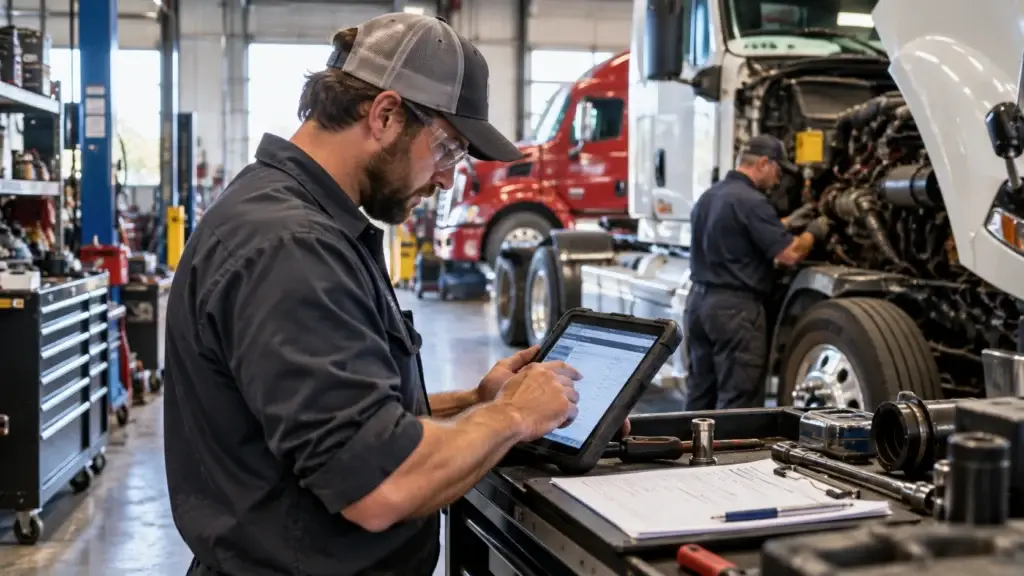
Modern shops equip technicians with mobile hardware that replaces the clipboard entirely. Tablets and smartphones bring information access straight to the bay instead of routing everything back through a shop-office computer.
Tablet and Smartphone Implementation
Technicians use ruggedized tablets built to survive shop environments, connecting directly to paperless management systems for instant access to repair histories and technical bulletins. A tech can reference a wiring diagram while working under a dash or verify a torque spec without walking back to a terminal. Built-in cameras attach high-resolution photos of damaged or worn components directly to the work order, creating visual documentation for the customer and any warranty administrator who asks for it later.
Voice-to-Text for Hands-Free Documentation
Voice recognition lets a technician dictate repair notes without stopping mechanical work — describing pad thickness or rotor condition while a brake job is still underway. Speech-to-text accuracy in shop environments has improved enough to handle background noise from air tools and running engines reasonably well, though it's still worth a technician's quick review before the note gets finalized.
Measuring the Productivity Impact
Do not rely on vendor claims about time saved. FMCSA, in its eDVIR rule, said it did not have data to quantify the cost savings of switching DVIRs to electronic and expected any savings to be small. Your shop is different, so measure it.
Pick a few numbers and record them before the switch: minutes from open to invoice, time spent searching for records, number of re-keyed entries, and the share of work orders with missing fields. Repeat the measurement after the rollout. HDJ's labor efficiency KPIs guide explains how to track hours consistently.
Search, Retrieval, and Records
Electronic systems change how a shop manages information over the long run, providing instant access to complete records through search rather than a physical archive.
Instant Access to Vehicle History
A technician pulls a complete vehicle record by entering a license plate or VIN, with every previous repair, service appointment, and inspection appearing immediately. That quick retrieval helps identify recurring issues and make informed diagnostic decisions grounded in the vehicle's actual history rather than memory.
Parts and Labor Documentation
Digital systems link component usage directly to specific work orders and vehicles, tracking which parts were installed, when, and by whom. That level of detail creates accountability while supporting inventory management and warranty verification.
| Documentation Type | Paper System | Digital System |
|---|---|---|
| Finding past invoices | Minutes, often more | Seconds |
| Tracking part warranties | Manual cross-reference | Instant, automatic flag |
| Locating service records | Physical file search | Search by VIN or plate |
Search also helps with fleet accounts that ask for service history on short notice. HDJ's fleet maintenance records guide covers what carriers keep and for how long, and its shop workflow guide shows where paperwork delays fit in the wider flow.
Implementation Strategies for Paperless Shop Management
Moving from paper to digital workflows works best as a phased rollout rather than a single flip of a switch. Breaking the process into stages prevents operational disruption and builds staff confidence along the way.
Here is a sample plan, and your shop may need more or less time. Phase 1 builds the digital foundation: set up accounts, choose templates, and begin scanning critical existing documents. Phase 2 converts daily work: paper inspection sheets become digital checklists, electronic signatures replace wet-ink ones, and training happens during slower periods. Phase 3 connects parts suppliers, customer communication, and the last paper forms.
Training Staff for Digital Workflow Success
Moving to digital workflows requires real training, not just handing someone a tablet. A well-planned rollout maximizes adoption while minimizing the disruption that comes with any new system.
Creating Digital Champions
Identify technically comfortable technicians in each department to master the system first and support their peers during rollout. Champions reduce resistance by demonstrating real benefits during routine tasks, and their feedback improves the training approach for everyone who follows.
Phased Rollout by Department
| Phase | Department | Sample timeline | Focus |
|---|---|---|---|
| 1 | Service Writers | Week 1-2 | Work order creation, customer data entry |
| 2 | Lead Technicians | Week 3-4 | Digital inspections, parts ordering |
| 3 | All Technicians | Week 5-6 | Time tracking, photo documentation |
| 4 | Parts & Admin | Week 7-8 | Inventory management, reporting |
Key Recommendation
Time how long a work order takes from open to invoice for two weeks, then repeat after the switch. Your own numbers will show whether the change paid off.
Cost Analysis: What to Count Before You Buy
The answer depends on your shop, so count costs before you buy. Use this table to gather your own numbers, then ask vendors for written quotes.
| Cost to count | What to include | How to measure |
|---|---|---|
| Paper and printing | Forms, toner, binders | Last 12 months of purchases |
| Storage | Floor space and filing cabinets | Square feet times your cost per square foot |
| Staff time | Filing, searching, re-keying | Time a typical week, then multiply |
| Rework | Errors, disputes, lost documents | Count jobs affected over 3 months |
| System cost | Subscription or license, training, devices | Get written quotes |
Here is an example with assumed numbers. Suppose 8 technicians each recover 10 minutes a day, which is 1.3 hours. At $120 per billable hour over 250 days, that is $40,000, but only if the freed time is filled with billable work. If the system costs an assumed $9,000 a year, payback takes about 2.7 months. Use your own figures.
Frequently Asked Questions
Do digital work orders satisfy federal recordkeeping rules?
Generally yes, with conditions. 49 CFR 390.32 allows electronic records and signatures if the documents accurately reflect the required information, can be retained and reproduced on time, and include proof of consent to electronic records. Check that your system meets each condition.
How long must maintenance records be kept?
Under 49 CFR 396.3, a motor carrier keeps each vehicle's inspection, repair, and maintenance records for 1 year at the location where it is housed or maintained, plus 6 months after it leaves the carrier's control. DVIRs and repair certifications are kept 3 months.
What should a heavy-duty digital work order include?
Include the unit number, VIN, odometer and engine hours, the complaint and any DVIR reference, authorization, labor lines, parts with expected arrival dates, sublet work, cores and warranty flags, photos, and a completion check.
How do digital work orders connect to DVIRs?
A DVIR defect becomes a work order, the repair is performed, and the motor carrier or its agent certifies the repair on the report. A digital work order that links to the source report and records who certified it keeps that chain in one place.
How should a shop roll out digital work orders?
Roll out in phases: set up accounts and templates, convert daily forms and signatures, then connect parts and customer communication. Name digital champions, train during slower periods, and time your own work order cycle before and after the switch.
The Bottom Line
Digital work orders solve real problems: lost paper, re-keyed data, and missing fields. They also fit federal recordkeeping rules when the system meets the conditions in 49 CFR 390.32, and the 2026 eDVIR rule makes electronic inspection reports explicit.
Heavy Duty Journal's guidance at heavydutyjournal.com, from publisher Michael Nielsen and the HDJ editorial team, is to start with a focused pilot, capture heavy-duty details on every order, enforce required fields, and measure your own results before and after.
As of October 2026, regulations and system features change, so confirm current rules and vendor details before relying on them.
Send This to Your Service Manager
Whoever still chases signatures and re-keys paper work orders can use this to plan the switch.