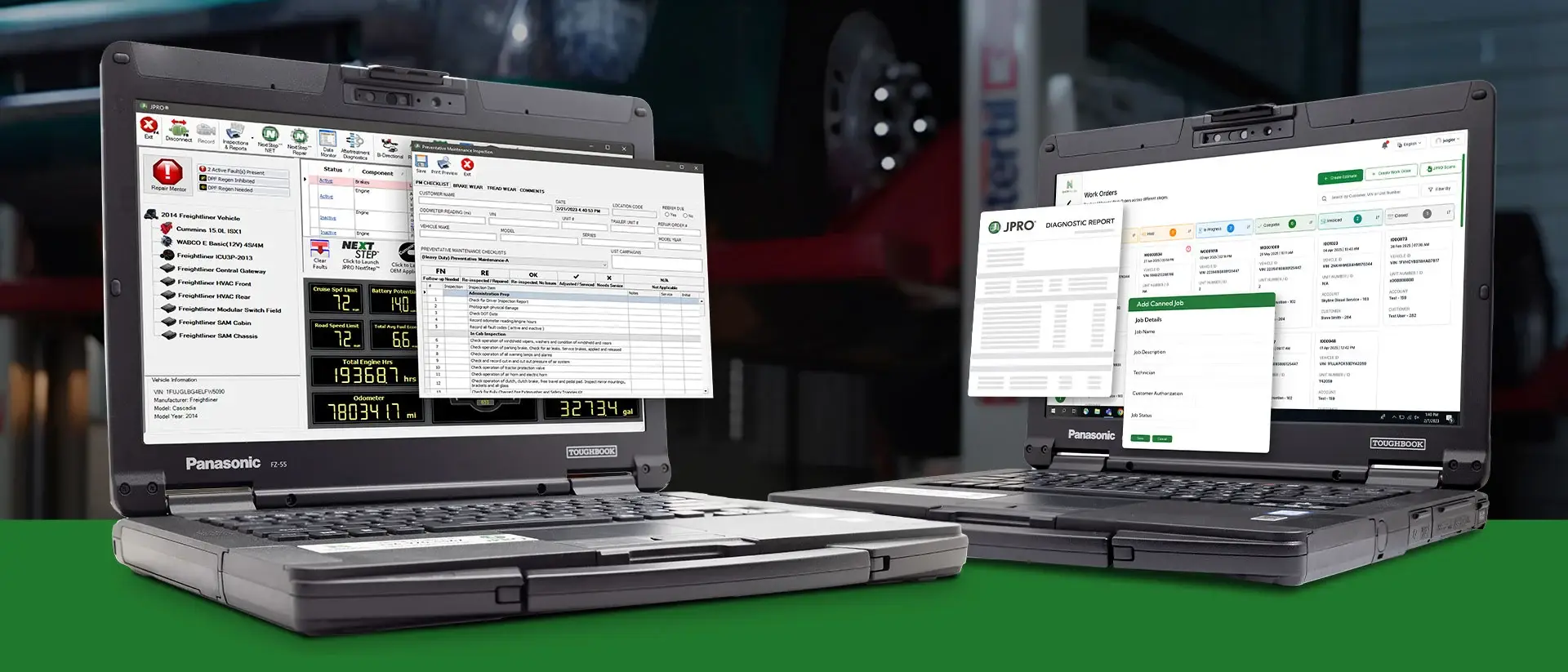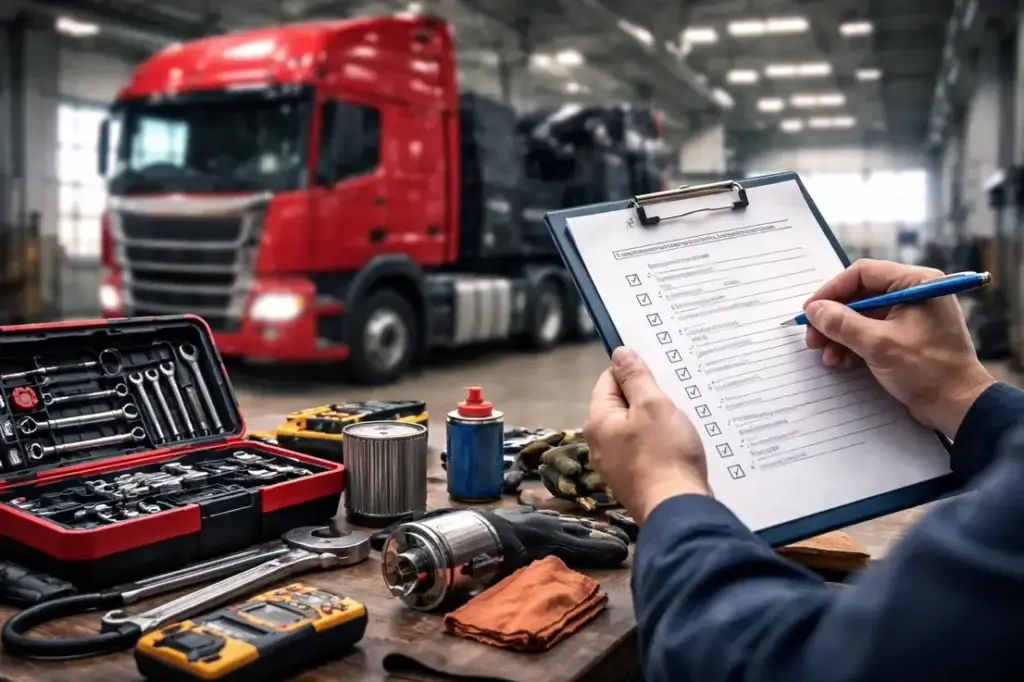
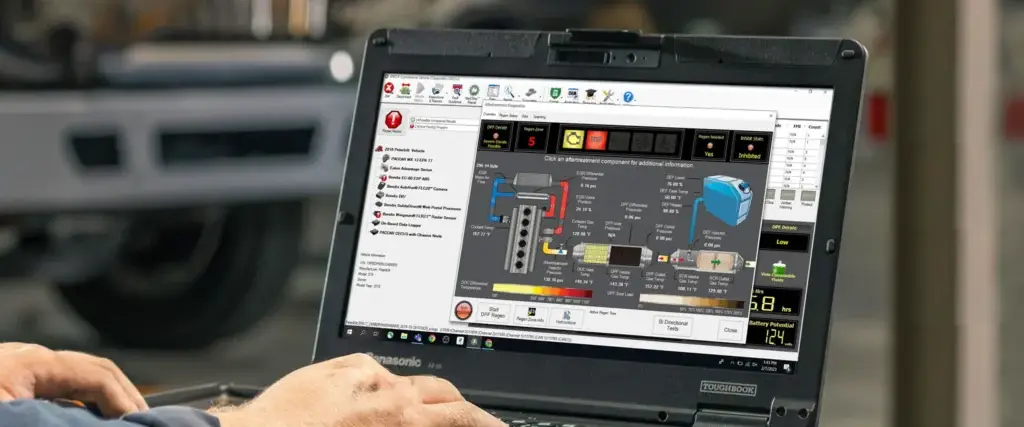
Diesel technician using a professional diagnostic tablet to troubleshoot a North American Class 8 semi-truck in a modern heavy-duty repair shop with the hood open and diagnostic interface connected.

Noregon JPRO Professional: A Complete, Honest Evaluation

By Michael Nielsen, Editor & Publisher | 15+ Years in Diesel Repair & Fleet Operations

Last Updated: September 2026

Noregon JPRO Professional is a multi-brand heavy-duty diagnostic platform that connects to a Class 6-8 truck and reads every onboard electronic module — engine, transmission, ABS, body controllers, trailer ABS — from a single screen in about 60 seconds.

Independent trade-press coverage and named working shop managers have described it as the standard multi-brand diagnostic tool in North American independent repair shops for close to a decade, a track record that holds up whether the source is a 2018 tool review or this year's coverage of its latest CAN Bus diagnostic update. Heavy Duty Journal built this guide to evaluate that reputation on its own editorial merits.

This guide evaluates JPRO on its own — not against competitors — because the question most shop owners researching it actually need answered isn't "which of four tools is best," it's "is this specific tool worth what it costs, for a shop like mine." That means covering what it does well, where it falls short, what onboarding actually looks like, and a straightforward framework for deciding fit before you request a quote.

Noregon JPRO Professional diagnostic software connected to a heavy-duty truck

Why This Decision Matters

The Real Cost of a Slow Diagnosis

A truck sitting in a bay while a technician pages through fault code manuals or waits on hold with a manufacturer's tech line isn't a minor inconvenience — it's a truck that isn't generating revenue for anyone, at a documented industry cost of several hundred dollars a day before the repair bill even starts. The diagnostic tool on a technician's cart either shortens that window or extends it.

That's the lens this guide uses throughout: not which tool has the longest feature list, but which one measurably gets a truck back on the road faster, for the kind of shop most likely to be reading this.

How We Evaluated This Platform

JPRO was assessed against five criteria weighted by operational impact on a heavy duty repair business: brand and equipment coverage breadth, bi-directional and programming depth, protocol and hardware compatibility, total cost of ownership, and support and training quality. Assessment drew on publicly available information — trade-press tool reviews, named technician testimonials in industry publications, and manufacturer update announcements covered by independent outlets. No claim in this guide comes from vendor marketing materials or a demo alone.

This is not a sponsored placement. HDJ has no financial relationship with Noregon Systems, and this guide contains no links to the vendor's website or product pages — the same independent-editorial standard applied across every buyer's guide on heavydutyjournal.com. Where a criterion couldn't be verified from public sources — Noregon does not publish JPRO's software pricing — that gap is noted directly rather than estimated.

Last methodology review: September 2026. Platform information verified as of the Last Verified date in the profile below.

Key Takeaways

  • JPRO connects to a vehicle and reads every onboard module in about 60 seconds — a speed advantage that compounds across dozens of daily diagnostic pulls in a busy bay.
  • Trailer diagnostics are a genuine differentiator: JPRO communicates directly with Bendix, Wabco/ZF, and Haldex/SAF-Holland trailer ABS modules, a depth most competing multi-brand platforms don't match.
  • Named shop managers have credited JPRO with cutting customer downtime "in half" in independent trade-press coverage going back to at least 2018 — not a one-off endorsement, but a consistent pattern across multiple publications and years.
  • JPRO requires a separately purchased RP1210-compliant vehicle interface — Noregon does not publish software subscription pricing, so budgeting requires a direct quote rather than a sticker price.
  • JPRO does not perform OEM-level ECU reflashing or deep parameter calibration — shops with a heavy calibration workload will need a secondary manufacturer-specific tool alongside it.

Who This Is For

JPRO fits a specific, common shop profile better than it fits every shop — the scenarios below describe where it delivers the strongest return.

The independent multi-brand shop. A five-to-fifteen-bay independent repair shop seeing Freightliner, Peterbilt, Kenworth, Mack, Volvo, and International in roughly equal measure needs one tool that reads all of them without separate manufacturer software for each. This is JPRO's core use case and where its full-vehicle scan speed matters most — a technician isn't relearning a different interface for every truck that rolls in.

Fleet maintenance operations with mixed tractor-trailer combinations. A private fleet or for-hire carrier running its own maintenance bay, where trailers cycle through as often as tractors, benefits from JPRO's trailer ABS coverage across Bendix, Wabco/ZF, and Haldex/SAF-Holland — diagnosing a trailer fault without a separate trailer-specific tool.

Shops carrying newer technicians without deep OEM-specific experience. JPRO's Fault Guidance and Repair Mentor features walk a less experienced technician through a prioritized troubleshooting path rather than requiring them to already know where to look — a real advantage for shops managing the industry's ongoing diesel technician shortage.

Operations that also service off-highway or construction equipment. Because off-highway, construction, and agriculture equipment coverage ships inside JPRO's standard subscription, a shop that occasionally services this equipment alongside on-highway trucks doesn't need a second platform purchase for that slice of the business.

What to Evaluate When Choosing a Diesel Diagnostic Tool

Vendor spec sheets make every tool in this category sound comprehensive. The differences that actually determine whether a tool earns back its cost come from five criteria that go deeper than a features list.

Brand & Equipment Coverage Breadth

Coverage breadth determines how many separate tools a shop needs to own. A platform that reads every brand in a shop's yard — including off-highway or agricultural equipment if that's part of the customer mix — replaces multiple single-brand purchases with one subscription. A platform that covers 90% of a shop's fleet still leaves the remaining 10% requiring a second tool, which erodes the cost argument for buying the first one.

$448–$760/day

Industry-estimated cost of commercial truck downtime, with larger fleet operations citing figures as high as $2,500 per day, per industry research including the American Transportation Research Institute's operational cost benchmarking — the financial backdrop against which any diagnostic tool investment should be measured.

Bi-Directional & Programming Depth

Reading a fault code is the easy part — confirming and fixing it requires bi-directional testing and, in many cases, OEM-level programming. Bi-directional controls let a technician command a component and watch the response, confirming a suspected failure before parts get ordered. Deeper programming functions — ECU reflashing, parameter calibration, injector coding after replacement — separate multi-brand diagnostic tools from platforms that can only read and clear codes.

Protocol & Hardware Compatibility

Protocol range determines which trucks a tool can actually talk to, spanning three decades of vehicle electronics. Legacy J1708/J1587 systems still run in pre-2001 trucks that remain in active commercial service. J1939 became the dominant heavy-duty CAN protocol from roughly 2000 onward. A shop servicing a mixed-age fleet needs a tool spanning the full range — not just the newest standard.

Total Cost of Ownership

The purchase price on a spec sheet is rarely the total cost. Some platforms bundle hardware, software, and a warranty period into one transaction; others price the diagnostic interface and the software subscription as entirely separate purchases, with the software itself often licensed annually. A tool that looks cheaper up front can cost more over three years once renewal fees and required hardware are added in.

Support, Training & Documentation Quality

A diagnostic tool is only as good as a technician's ability to use it under pressure. Platforms with strong documented technical support, structured training programs, and an established base of working shops willing to vouch for real-world performance reduce the risk of an expensive tool sitting underused in a drawer.

Stay Current on Diagnostic Technology

Get the latest diagnostic tool reviews, protocol updates, and shop efficiency strategies delivered to your inbox weekly.

Noregon JPRO Professional — Full Profile

Best ForIndependent and fleet shops running a mixed North American truck brand yard that want the fastest full-vehicle fault picture without managing multiple manufacturer-specific software licenses.

HDJ Editorial Rating

HDJ Top Pick

Based on publicly available information. See methodology above.

Profile last verified: September 2026 against independent trade-press coverage.

Noregon Systems, based in Greensboro, North Carolina, has built JPRO Professional into what industry trade press and working technicians repeatedly describe as the standard multi-brand diagnostic platform in North American independent shops — a track record documented in tool reviews from 2016 through the most recent 2026 CAN Bus update coverage, not a reputation built on a single flattering write-up.

Strengths

JPRO's full-vehicle connection speed is its most consistently praised capability — reading every onboard module across manufacturers from a single screen in approximately one minute, a speed advantage that compounds across a full day of diagnostic pulls.

  • Fault Guidance and the Repair Mentor feature provide step-by-step, prioritized troubleshooting paths tied to more than 44,000 OE-level fault code descriptions, reducing reliance on tribal knowledge for less experienced technicians.
  • Trailer diagnostics are a genuine differentiator: JPRO communicates directly with Bendix, Wabco/ZF, and Haldex/SAF-Holland trailer ABS modules — depth that most competing multi-brand platforms don't match.
  • Off-highway, construction, and agriculture equipment coverage ships inside the standard JPRO subscription at no additional cost, rather than as a separately priced module.
  • Real shop reviews in trade press are consistently positive and span nearly a decade — a Pilot Travel Centers service manager credited JPRO with cutting customer downtime "in half," and a Greensboro-area tire service manager independently praised its speed across a wide range of heavy duty vehicles.
  • A 2026 update expanded Repair Mentor's CAN Bus diagnostic tools, walking technicians through electrical circuit fault-location and live-data graphing without requiring a multimeter or a more experienced coworker — coverage independently reported by Fleet Maintenance, Fleet Equipment, and Truck Parts and Service.

Considerations

JPRO's Fault Guidance is text-based rather than visual — it does not include wiring diagrams or component-location graphics, which matters for shops that lean heavily on visual troubleshooting aids. JPRO also requires a separately purchased RP1210-compliant vehicle interface, most commonly a NEXIQ USB-Link or Noregon's own DLA+ adapter, priced and purchased apart from the software; Noregon does not publish JPRO's software subscription pricing, so shops need a direct quote to budget accurately.

And while JPRO's bi-directional testing covers most day-to-day diagnostic needs, it does not perform OEM-level ECU reflashing or deep parameter calibration — shops running a heavy calibration workload will still need a secondary manufacturer-specific tool for that work.

Who Should Look Elsewhere

Shops that work almost exclusively on European or off-brand international trucks should research platforms with deeper coverage in that specific segment before committing to JPRO. Shops that need OEM-level ECU reflashing and parameter programming as a core, frequent service line should plan to pair JPRO with manufacturer-specific software rather than expecting it to cover that work alone.

Best Fit: Independent and mid-size fleet shops running a mixed North American brand yard — Freightliner, Peterbilt, Kenworth, Mack, Volvo, International — that want the fastest path to a full-vehicle fault picture and value trailer diagnostics bundled into the same subscription.

HDJ Verdict

JPRO earns HDJ's Top Pick rating on independent editorial merit because it's the platform independent shops and trade press most consistently point to as the North American standard — fast, broadly trusted, and unusual in bundling trailer and off-highway diagnostics into one subscription. It isn't the deepest programming tool on the market, and shops need to budget separately for RP1210 hardware and a software quote, but for the mixed-brand yard that defines most independent heavy duty shops, it's a strong starting point.

Implementation & Onboarding

Adopting JPRO involves two separate purchases arriving on two separate timelines, and shops that don't plan for that sequencing lose their first week of ownership to logistics rather than diagnostics.

The hardware — an RP1210-compliant adapter such as a NEXIQ USB-Link or Noregon's own DLA+ — typically ships and is ready to use as soon as it arrives; it's commodity hardware with no configuration beyond a driver install. The software license is the piece that requires a direct conversation with Noregon or an authorized reseller, since pricing isn't published and terms vary by shop size and subscription length.

Order both together and confirm compatibility explicitly — an older RP1210 adapter purchased for a different diagnostic title may not be the version JPRO's current release expects.

Once installed, a technician's first connection to a vehicle is close to the full learning curve — the software's single-screen, full-vehicle-scan design is built to be usable without extensive prior training, which is part of why trade-press reviewers have repeatedly called it approachable for newer technicians.

Fault Guidance and Repair Mentor are the features worth deliberately walking a new technician through in their first week, since they're what differentiates JPRO's guided troubleshooting from a bare fault-code reader — a technician who only learns to pull codes and never opens Repair Mentor is using a fraction of what the subscription includes.

Software updates arrive as part of an active subscription at no additional cost, and shops should build a habit of installing them when prompted rather than deferring — new coverage, new bi-directional tests, and feature updates like the 2026 CAN Bus diagnostics expansion only benefit a shop once installed.

The most common friction point in the first 90 days isn't the software itself but confirming which RP1210 hardware generation a shop already owns is actually compatible with the current JPRO release — worth confirming with a reseller before assuming an existing adapter from another diagnostic tool will work.

Is JPRO Right for Your Shop?

Answer these questions honestly. The more "yes" answers, the stronger the fit.

Does your bay regularly see three or more North American truck brands — Freightliner, Peterbilt, Kenworth, Mack, Volvo, or International — rather than one or two dominant brands?
Do trailers come through your shop often enough that trailer ABS diagnostics (Bendix, Wabco/ZF, Haldex/SAF-Holland) would get regular use, not occasional use?
Is diagnostic speed — minutes saved per vehicle, multiplied across a full day — a meaningful part of your shop's throughput problem, not just a nice-to-have?
Do you have at least one newer or less-experienced technician who would benefit from guided, prioritized troubleshooting rather than working from memory alone?
Can your shop budget for an RP1210 hardware purchase and an annual software license as two separate line items, without a published price to plan against upfront?
Is OEM-level ECU reflashing and deep parameter calibration a small or occasional part of your work, rather than a core daily service line?
Does your customer mix occasionally include off-highway, construction, or agriculture equipment alongside on-highway trucks?

If you answered yes to fewer than three questions, JPRO may not be the strongest fit for your current operation — a platform with deeper OEM programming depth or narrower brand focus may serve your shop better. If you answered yes to five or more, JPRO is very likely worth requesting a quote for.

Editorial Insight

The HDJ Perspective

After 15 years around diesel diagnostic equipment, Michael Nielsen has seen the same mistake play out with almost any tool in this category, JPRO included: treating a vendor's demo unit like a preview of their own workday. A diagnostic tool that flies through a clean demo truck with a single staged fault code tells you almost nothing about how it performs on a customer's 2014 Cascadia with three intermittent faults and a corroded connector. Ask to run it on a real problem vehicle in your own bay before you commit.

The second thing shops consistently underweight with JPRO specifically is the hardware-versus-software split. A shop can buy an RP1210 adapter thinking they've bought a complete solution, then discover the software that actually makes it useful is a separate, ongoing cost with no published price. Ask point-blank before you commit: what does this specific purchase include, and what will you need to buy separately to actually diagnose a truck on day one?

How to Evaluate It Yourself

What's Actually Included — Hardware, Software, or Both?

JPRO is software, not a complete hardware-plus-software bundle — a distinction worth confirming with any reseller before comparing it to a price you've seen for an all-in-one tablet elsewhere. Ask directly: does a JPRO quote include the RP1210 adapter, or is that priced and shipped separately? Get the answer in writing before treating any number as the total cost. If your shop is evaluating multiple technology purchases at once, HDJ's shop management software comparison guide applies this same include-everything-or-not scrutiny to that category.

How Deep Does the Programming and Bi-Directional Testing Go?

Ask for a live demonstration of a bi-directional test on a specific system your shop actually services often — not a generic walkthrough. Then ask directly whether JPRO performs OEM-level ECU reflashing for your most-serviced brands, since the honest answer for most brands is no; confirming that gap upfront prevents a surprise mid-repair months into ownership.

Does It Cover the Protocols and Brands Your Fleet Actually Runs?

Pull the actual brand and model-year mix from your shop's last 90 days of work orders before requesting a quote. Confirm protocol support explicitly for your oldest and newest trucks — pre-2001 J1708/J1587 systems and current CAN protocols are the two ends of the range most likely to expose a coverage gap for any platform.

What's the Real Three-Year Cost, Not Just the First Invoice?

Build out the full three-year cost before signing: initial hardware, initial software license, and annual renewal fees. Since Noregon doesn't publish subscription pricing, request a written three-year estimate from your reseller rather than budgeting off the first year's invoice alone — a first-year promotional rate is not necessarily the ongoing rate.

Can You Verify Real Shop Experience, Not Just This Guide?

Search for the platform's name alongside terms like "review" or "shop" on trade publications and technician forums before buying, and ask any reseller for references from working shops in your region. Independent trade-press coverage with named technicians carries more weight than any single guide, including this one.

Frequently Asked Questions

Is Noregon JPRO Professional a good diagnostic tool for independent repair shops?

Based on HDJ's editorial assessment, yes, for a shop running a mixed North American truck brand yard. It connects to a full vehicle in about 60 seconds, bundles trailer and off-highway diagnostics into one subscription, and has a nearly decade-long track record of positive trade-press coverage. It's a weaker fit for shops needing OEM reflashing or heavy European-brand volume.

How much does Noregon JPRO Professional cost?

Noregon does not publish JPRO's software subscription pricing publicly, and the required RP1210 hardware is sold separately from the software. Shops need a direct quote from Noregon or an authorized reseller to budget accurately, and should request a three-year cost estimate rather than relying on a first-year invoice alone.

Do I need separate hardware to use JPRO, or does it come as a complete kit?

JPRO is software that requires a separately purchased RP1210-compliant adapter, most commonly a NEXIQ USB-Link or Noregon's own DLA+ line. It is not sold as a complete all-in-one kit the way some competing platforms are. Confirm exactly what a quote includes before comparing it to a bundled competitor's price.

Does JPRO perform OEM-level ECU reflashing?

No, not as a general capability across brands. JPRO's bi-directional testing covers most day-to-day diagnostic needs, but deep parameter calibration and OEM-level reflashing generally still require manufacturer-specific software alongside it for shops where that work is a frequent service line.

Can JPRO diagnose trailers as well as tractors?

Yes — this is one of JPRO's clearest differentiators. It communicates directly with Bendix, Wabco/ZF, and Haldex/SAF-Holland trailer ABS modules, giving shops trailer diagnostic depth without a separate trailer-specific tool purchase.

Is JPRO good for newer or less-experienced technicians?

Trade-press reviewers have repeatedly noted this as a strength. JPRO's Fault Guidance and Repair Mentor features walk a technician through a prioritized troubleshooting path rather than requiring prior knowledge of where to look, and the 2026 CAN Bus diagnostic update specifically added guided circuit fault-location that reduces reliance on a multimeter or a more experienced coworker.

The Bottom Line

JPRO Professional earns its reputation honestly. Nearly a decade of independent trade-press coverage, named technicians willing to put specific numbers behind their praise, and a genuinely differentiated trailer diagnostics feature set are not marketing claims — they're a documented track record. For the independent or mid-size fleet shop running a mixed North American brand yard, it remains one of the strongest starting points in this category.

It isn't the right tool for every shop. Operations with heavy European-brand volume, or those needing OEM-level reflashing as a core service line, will need to look elsewhere or pair JPRO with a second platform. And because Noregon doesn't publish pricing, no shop should treat a first quote as the full picture without asking for a three-year cost estimate in writing.

Pull your last 90 days of work orders before requesting a quote. Confirm exactly what's included in the purchase. Run the tool on a real problem truck in your own bay, not a vendor's showcase unit. Then decide based on what actually comes through your bay — not on which spec sheet reads the most impressively, a discipline Heavy Duty Journal applies across every buyer's guide it publishes on heavydutyjournal.com.

For Manufacturers & Software Providers

Want Your Product Featured in an HDJ Buyer's Guide?

This deep-dive format — independent evaluation, an honest fit framework, and a direct answer for shop owners — is also available as a sponsored placement for diagnostic tools, shop software, and equipment brands serving the heavy duty repair and fleet maintenance market.

Learn About Buyer's Guide Placements →

Help Fellow Technicians Make Smarter Investments

Share this evaluation with your network to help other shops make informed equipment decisions before their next demo.

Leave a Comment

Your email address will not be published. Required fields are marked *

Free Guide

The Working Tech's Tool Guide

Shop-Tested. Field-Approved. Zero Fluff.

9 Categories Covered:

🔧 Shop & Bay 🔍 Diagnostic ⚙️ Engine 🔩 Drivetrain 💨 Air & Brake 🚛 Service Truck 🏗️ Heavy Equipment 🦺 PPE & Safety 🛞 Tire Repair
Vetted Tools Only gear a diesel pro would actually buy.
All Disciplines From shop bay basics to heavy equipment.
Always Free No login. No paywall. Just the guide.
Browse the Tool Guide →

Expert Diesel Knowledge. Always Free.