
By Michael Nielsen, Publisher | 15+ Years in Diesel Repair & Fleet Operations
Last Updated: October 2026
⏱ Estimated reading time: 13 minutes
FMCSA identity verification is the Federal Motor Carrier Safety Administration (FMCSA) process that confirms the person registering a company is who they claim to be, using a government-issued photo ID and a facial scan, before a USDOT number or operating authority is granted or managed. As of October 2026, it runs inside Motus, FMCSA's USDOT registration system, and it applies to new applicants and existing registrants alike.
This Heavy Duty Journal guide explains how the process works, who must complete it, what changed between 2025 and 2026, and how to avoid the problems carriers are reporting. It is built from FMCSA, Federal Register, and U.S. Department of Transportation sources, and it replaces an earlier version that described a system FMCSA has since retired.
Key Takeaways
- ✓The system changed in 2026. FMCSA now handles identity verification inside Motus, its new USDOT registration system, which retired the Unified Registration System and the Portal's registration functions, so guides that describe the old screens are out of date.
- ✓Existing registrants are included. New applicants and roughly 800,000 existing registrants must verify when they first use Motus, which means a carrier that registered years ago still has a verification step ahead.
- ✓One email can lock you out. Motus requires Login.gov, and the Portal company official must sign in with the same Login.gov email to claim the company's USDOT number and data.
- ✓Verified does not mean vetted. Identity verification screens who registers, not how a carrier performs, so brokers and shippers still need their own checks.
In This Guide
- What Is FMCSA Identity Verification?
- How FMCSA Identity Verification Works in Motus
- Who Must Complete FMCSA Identity Verification
- FMCSA Identity Verification Timeline: What Changed and When
- How to Prepare for FMCSA Identity Verification
- What to Do When FMCSA Identity Verification Fails
- Biennial Updates While FMCSA Stabilizes Motus
- Spotting Fake Motus Sites and Registration Scams
- Using FMCSA Identity Verification to Vet Carriers and Brokers
- Frequently Asked Questions
- The Bottom Line
What Is FMCSA Identity Verification?
FMCSA identity verification is a registration safeguard that checks a registrant's identity document against the person presenting it. FMCSA describes it as part of any new registration, intended to reduce fraudulent information in registration records and protect sensitive data, per its Federal Register notice on Motus.
The Federal Motor Carrier Safety Administration partnered with IDEMIA in April 2025 to capture and verify identity documents in the Unified Registration System (URS), which was then FMCSA's online registration path for new applicants. With Motus, the same idea now covers every registrant, and FMCSA has added separate business verification, described below.
The reason is fraud. FMCSA reports a significant increase in presumed fraudulent activity, including identity theft, hijacked carrier accounts, the sale of motor carrier numbers and personal identification numbers, and fake initial registrations. The U.S. Department of Transportation estimated in May 2026 that several thousand suspicious registration numbers may be tied to fraudulent carriers, according to its announcement of Motus.
How FMCSA Identity Verification Works in Motus
Identity verification in Motus has three layers: a Login.gov account, a document-and-face identity check, and a separate business verification of the company. Login.gov is the federal government's single sign-on service, and FMCSA says any individual, business, filer, or authorized agent using Motus needs Login.gov credentials, per AskFMCSA.
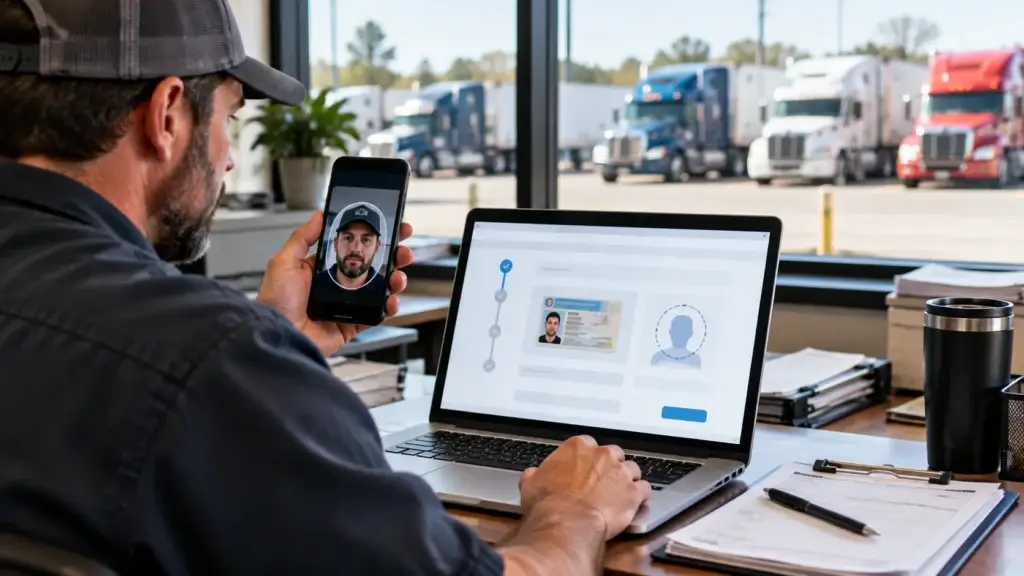
The identity check itself is done on a smartphone or tablet. According to FMCSA's Federal Register notice, the applicant scans a QR code in Motus to open a verification session, selects a language, document country, and document type (identity card, driver's license, passport, or resident card), photographs the document, scans their face, and returns to Motus to finish.
Business verification is a distinct step. FMCSA partnered with CLEAR in September 2025 to confirm a company's authenticity and validate its legal name, principal place of business (PPOB) address, ownership structure, company officials, and status. FMCSA says it and its vendor will not store, share, or sell the identity information collected.
| What You Need | Used For | Notes |
|---|---|---|
| Login.gov account | Signing in to Motus with multi-factor authentication | One account per person; the email must match the one tied to your FMCSA Portal record |
| Smartphone or tablet with a camera | Scanning the QR code, the ID document, and your face | Needed for the QR-code verification session |
| Valid government-issued photo ID | Identity document capture | Identity card, driver's license, passport, or resident card |
| Accurate company information | Business verification | Legal name, PPOB address, ownership, and company officials must match your records |
FMCSA also designed Motus for mobile use, so registrants can view and update registration information from a phone or tablet. FMCSA also says registrants can record payment through Pay.gov for registration transactions where fees apply.
Motus does not use a USDOT personal identification number (PIN) to create an account, according to FMCSA. That removes one legacy credential that scammers were selling, but it makes control of the Login.gov account the key to your registration.
Who Must Complete FMCSA Identity Verification
Anyone applying for a new USDOT number or operating authority must pass identity verification, and so must existing registrants. FMCSA says it will verify the identity of all new applicants and approximately 800,000 existing registrants when they first access Motus, and it adds that existing registrants will complete identity and business verification before completing any transactions in the new system.
That reverses what many 2025 guides told readers, which was that existing carriers would be verified only at renewal. Under the Motus rollout, the trigger for an existing carrier is its first login, not its biennial update date.
Several roles are affected:
- Motor carriers: The company official on the FMCSA Portal account claims the USDOT number in Motus.
- Freight brokers and freight forwarders: They register and manage operating authority in Motus with the same Login.gov and identity steps.
- Supporting companies: Transportation service providers, blanket company (BOC-3) filers, and insurance or surety filers also need Login.gov accounts, per FMCSA.
- Additional users: A main account holder can invite sub-account holders, who create their own profiles only after receiving an invitation.
Owner-operators who hold their own USDOT number are both the registrant and the driver, so in practice the owner completes the registrant steps. Service providers who file on a client's behalf do not bypass the process: FMCSA says they need their own Login.gov accounts, and its notice describes them as performing authorized functions on behalf of the regulated entity.
The public does not need an account to view public registration data in Motus. FMCSA says public users can search a registration record without signing in, which is the basis for the carrier checks described later.
FMCSA Identity Verification Timeline: What Changed and When
The timeline runs from April 2025 to the Motus launch in May 2026. FMCSA retired its legacy registration tools at 8:00 p.m. Eastern on May 14, 2026, and opened Motus profile creation to all registrants on May 19, 2026. The table below summarizes the key dates as of October 2026.
| Date | Event | Why It Matters |
|---|---|---|
| April 2025 | FMCSA partners with IDEMIA for identity verification in URS | First identity checks for new applicants |
| September 2025 | FMCSA partners with CLEAR for business verification | Adds company-level validation |
| December 8, 2025 | Motus Phase I opens to supporting companies | Service providers and filers set up accounts first |
| April 29, 2026 | Federal Register notice announces Motus | Describes Phase II and the end of URS for new applications |
| May 14 and 19, 2026 | Legacy registration tools retired; Motus opens to all registrants | Login.gov and identity verification now required |
| June 2026 onward | FMCSA suspends USDOT inactivation for missed biennial updates | Temporary relief while the system stabilizes |
The phased rollout explains why guidance differed depending on when a carrier asked. In Phase I, from December 2025, only supporting companies such as BOC-3 filers, insurance or surety filers, and transportation service providers could create accounts, so they were ready to help registrants when Phase II opened to everyone.
Two points often misreported are worth correcting. FMCSA's notice states that the Phase II release of Motus does not include the elimination of Motor Carrier (MC) and Freight Forwarder (FF) docket numbers, safety registration, or changes to the Form BOC-3 filing process, so those items are not part of this change.
FMCSA also continues to accept paper forms accompanied by government-issued identification until a regulatory change eliminates them. Paper applications take longer, with a minimum of eight business days for initial review according to the notice, before any additional vetting time.
How to Prepare for FMCSA Identity Verification
Preparing for identity verification means getting your Portal account, Login.gov account, device, and records lined up before you start. HDJ's cost and timeline of getting trucking authority guide covers how Motus fits into the new-applicant process.
Step 1: Confirm the Company Official and Login.gov Email
Identify the company official on your FMCSA Portal account and confirm they have, or will create, a Login.gov account under the same email. The U.S. Department of Transportation states that carriers already using the Portal through Login.gov must use the same account to have their data available in Motus.
Key Recommendation
Before anyone starts verification, confirm that the person listed as company official on your FMCSA Portal account uses a Login.gov account under that exact email. A mismatch is the most avoidable way to be locked out of your own USDOT number.
Step 2: Review Users and Company Information
Before launch, FMCSA asked registrants to review records for accuracy, update process agent and insurance filings, save a copy of their records to compare against Motus, and remove Portal users who have left or no longer need access. Those steps still make sense, because verification validates information such as your PPOB and company officials.
Step 3: Prepare the Device and Documents
Use a smartphone or tablet with a working camera, a valid government-issued photo ID that matches the name on your records, and good lighting for the face scan. FMCSA also publishes an identity verification page with a fact sheet and demonstration for first-time users.
Step 4: Complete Verification and Verify Your Record
Follow the Motus prompts through the QR code, document, and face steps, then check that your USDOT number, legal name, and operating information display correctly. HDJ's guide on how to check a DOT number explains how to read the record and what FMCSA's temporary pause on deactivations means for it.
What to Do When FMCSA Identity Verification Fails
When verification fails, the first move is to contact FMCSA's Contact Center at 1-800-832-5660, which may refer you to a designated physical location to complete the process, according to AskFMCSA. FMCSA says it introduced verification to register only entities that are willing and able to comply with statutory and regulatory requirements.
Common causes are practical ones. A Login.gov email that does not match the Portal company official, a blurry or glare-covered document photo, and company details that do not match records can all stop a first attempt. FMCSA's PPOB review is also strict: it must reject an application if the address submitted could never satisfy the principal place of business requirements.
Paper forms remain an option for people who cannot complete electronic transactions, though FMCSA warns they take longer than online filings. Treat paper as a fallback, not a workaround, because the same identification must accompany the forms.
Biennial Updates While FMCSA Stabilizes Motus
The biennial update is the registration update that carriers must file every 24 months to keep their USDOT information current, and it remains required even though FMCSA has paused inactivation for missed filings. As of October 2026, FMCSA has temporarily suspended the inactivation of USDOT numbers for entities that have not completed the required update since June 1, according to its notice on the suspension.
The notice tells registrants they will receive additional time and should not worry about inactivation resulting from Motus-related access or system issues. It does not eliminate the requirement, and FMCSA has said it will share additional guidance as stabilization continues, so confirm the current status before relying on the pause.
The practical advice is to keep trying to file when the system allows it. Use FMCSA's Contact Center to document access problems, since a record of attempted filings is stronger than silence if questions arise later.
Spotting Fake Motus Sites and Registration Scams
Fake Motus messages are a real risk because registration credentials are valuable. FMCSA maintains a fraud alerts page on its registration site to inform customers of known fraudulent activity directed at the commercial motor vehicle industry, and carriers should check it when a message about an "update" or "verification" arrives unexpectedly.
⚠️ Safety Warning
Scammers target registration systems because a hijacked carrier account can be used to steal freight. Reach Motus only through links on FMCSA's own website, treat any message that points to a different domain as suspect, and never share Login.gov credentials or identity documents by email or text.
If you suspect fraud aimed at your registration, FMCSA's Ask FMCSA site lists a topic for filing a complaint or reporting fraud, and the Contact Center at 1-800-832-5660 can route the report.
Three habits help. Type the address from FMCSA's own pages instead of clicking a message link, confirm that the domain ends in dot-gov, and be suspicious of anything that asks for payment to complete a government registration step. HDJ's freight fraud prevention guide covers how impersonation and identity theft show up in day-to-day freight transactions.
Using FMCSA Identity Verification to Vet Carriers and Brokers
Free DOT Status Check
Enter a USDOT number and quickly review public carrier status, operating authority and key FMCSA registration data.

HDJ's free DOT Status Check at heavydutyjournal.com is a quick way to review a carrier's public USDOT status and operating authority before you dig deeper into the record.
Identity verification helps brokers, shippers, and carriers because it makes it harder to register under a false identity, but it does not replace vetting. A verified owner can still run an unsafe fleet, lapse on insurance, or default on payment, which is why FMCSA registration data should be one input among several.
Use the public registration search to confirm that a company's USDOT number, legal name, and operating authority status match what the carrier told you. Compare the contact details in FMCSA's record with the phone number and email you were given, and be cautious when a newly registered carrier asks for unusual payment terms or quick changes to the load.
Driver credentials remain a separate matter from registrant identity. A carrier's obligation to keep a driver qualification file under 49 CFR 391.51 is unchanged by Motus, and drivers are not verified through Motus unless they are also the person registering the company.
Frequently Asked Questions
What is FMCSA identity verification?
FMCSA identity verification confirms that the person registering a company matches a government-issued photo ID, using a document scan and facial scan completed on a phone or tablet. As of October 2026, it takes place in Motus, FMCSA's USDOT registration system, alongside a separate business verification of the company.
Do existing carriers need to complete FMCSA identity verification?
Yes. FMCSA says it will verify the identity of new applicants and roughly 800,000 existing registrants when they first access Motus, and existing registrants complete identity and business verification before completing transactions in the system. The trigger is first use of Motus, not the renewal date.
What do I need to complete identity verification in Motus?
You need a Login.gov account using the same email as your FMCSA Portal company official, a smartphone or tablet with a camera, and a valid government-issued photo ID such as a driver's license or passport. Accurate company information is also needed for business verification.
What happens if I cannot pass identity verification?
Call FMCSA's Contact Center at 1-800-832-5660. FMCSA says you may be referred to a designated physical location to complete the process. Paper forms with government-issued identification are still accepted, but they take longer, with a minimum initial review time of eight business days.
Is the biennial update still required?
Yes. As of October 2026, FMCSA has temporarily suspended inactivation of USDOT numbers for missed biennial updates due on or after June 1, 2026, but the requirement has not been eliminated. FMCSA says it will give advance notice before enforcement resumes, so confirm the current status first.
Does identity verification guarantee a carrier is legitimate?
No. It reduces the chance of a registration under a false identity, but it does not evaluate safety performance, insurance continuity, or payment reliability. Brokers and shippers should still check FMCSA registration data, insurance, and operating status, then monitor the carrier's behavior on every load.
The Bottom Line
FMCSA identity verification is now part of Motus, and it applies to new applicants and existing registrants. The steps are manageable when the Login.gov email matches the Portal record, the company information is accurate, and the person completing the check has a phone or tablet and a valid ID.
Heavy Duty Journal's guidance, from publisher Michael Nielsen and the HDJ editorial team, is to treat identity verification as a deadline for your own records and a screening step for your partners. Fix company information, confirm your account access, and verify carriers independently every time.
As of October 2026, details such as the biennial update pause may change, so confirm current requirements on FMCSA's registration pages before acting.
Send This to Your Compliance Contact
Know a carrier owner, broker, or dispatcher still working from guides that describe FMCSA's old registration screens? Pass this along so they get through Motus identity verification the first time.